
Advanced Traffic Control Rules Configuration
💡 About Traffic Control Rules
Traffic control rules can help you more precisely control which traffic goes through proxy and which goes direct, thereby saving traffic consumption and improving access speed.
1. Shadowrocket Traffic Control Rules Configuration
Global Routing Mode Description
The commonly used Global Routing on the home page has two modes:
🔹 Proxy
Global proxy mode, configuration file will not take effect. All software on the phone will go through proxy, not local network.
🔹 Config
Software on the phone will be split according to the configuration file you selected.
Configuration File Parameter Introduction
⚠️ Note
Configuration file only takes effect when Global Routing selects Config
Type
Commonly used is DOMAIN-SUFFIX (match domain or suffix)
Policy
Divided into three types:
- DIRECT - Specify a domain to use local network, not proxy
- PROXY - Specify a domain to use proxy
- REJECT - Specify a domain to reject connection
Configuration Example
[Rule]
DOMAIN-SUFFIX,rola-ip.co,DIRECT          # Rola website goes direct
DOMAIN-SUFFIX,refresh.rola.vip,DIRECT   # Switch IP link goes direct
IP-CIDR,47.100.189.137/24,DIRECT         # 47.100.189.137 IP goes direct
DOMAIN-SUFFIX,icloud.com,REJECT          # icloud.com domain rejects access
FINAL,PROXY                              # All other domains go through proxy
💡 Rule Description
DOMAIN-SUFFIX- Match domain suffixIP-CIDR- Match IP address rangeDIRECT- Direct connectionPROXY- Connect via proxyREJECT- Reject connectionFINAL- Fallback rule, matches all unmatched requests
2. Postern Traffic Control Rules Configuration
Rule Description
ℹ️ Rule Execution Order
Rules are checked from top to bottom, and stop checking after matching the first rule
Parameter Introduction
Match Type
- Match domain suffix
- Match all addresses
Action
- Direct connection
- Connect via proxy
Target Address
- Fill in domain
- Multiple domains separated by semicolon (
;)
Configuration Example
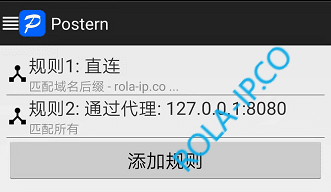
Rule 1:
- Match Type: Match domain suffix
- Action: Direct connection
- Target Address:
rola-ip.co ; refresh.rola.vip - Description: Rola website domain and switch IP link both go direct (local network)
Rule 2:
- Match Type: Match all addresses
- Action: Connect via proxy
- Description: All domains except Rule 1 go through proxy
3. Proxifier Traffic Control Rules Configuration
Rule Description
ℹ️ Rule Execution Order
Rules are checked from top to bottom, and stop checking after matching the first rule
Parameter Introduction
- Name - Rule name, customizable
- Applications - Specify which programs use this rule
- Target hosts - Specify which domains or IPs use this rule
- Target ports - Specify ports
- Action
- Direct - Direct connection
- Proxy - Connect via proxy
- Block - Block connection
Configuration Example
Rule 1: Rola Website Direct
- Name: Rola Direct
- Target hosts:
rola-ip.co; refresh.rola.vip - Action: Direct
Rule 2: Global Proxy
- Name: Global Proxy
- Target hosts:
*(all addresses) - Action: Proxy
💡 Usage Tips
- Set commonly used local services and admin backends to direct to save traffic
- Use wildcard
*to represent all addresses - Can set rules for specific programs
📊 Recommended Configuration Schemes
Scheme 1: Save Traffic (Recommended)
Rule 1: rola-ip.co direct
Rule 2: refresh.rola.vip direct
Rule 3: All other addresses proxy
Use Case: Most users, can use proxy normally while saving traffic
Scheme 2: Global Proxy
Rule: All addresses proxyUse Case: Users who need all traffic to go through proxy
Scheme 3: Whitelist Mode
Rule 1: Specified business domains proxy
Rule 2: All other addresses direct
Use Case: Only specific websites need proxy
🔧 Common Issues
Why configure traffic control rules?
Traffic control rules can:
- Save traffic - Local websites go direct, don't consume proxy traffic
- Improve speed - Domestic websites go direct faster
- Avoid issues - Some websites may limit access when detecting proxy
What to do if rules don't take effect?
- Ensure Global Routing mode is set to "Config"
- Check rule order, rules are matched from top to bottom
- Restart proxy software
- Clear application cache
How to test if rules are working?
- Visit
http://ip123.into check current IP - Visit Rola backend (should show local IP)
- Visit other websites (should show proxy IP)