
Parameters
Rola IP controls the proxy exit through parameters carried in the username (account name) — country, state, city, session, and everything else is written into the username. Here is one complete username that includes every detail parameter:
test_1-country-us-state-ny-city-newyork-sessiontime-10Breaking it down segment by segment, each part maps to one control:
| Username segment | Parameter | Meaning |
|---|---|---|
test | account name | Your proxy account name (the base, required) |
_1 | sessionid | Session identifier, written after the underscore; separates independent sessions and IPs |
-country-us | country | Target exit country, here the US |
-state-ny | state | Target state/province — value is a state code (ny); Rotating Residential only |
-city-newyork | city | Target city — value is the city name (newyork); Rotating Residential only |
-sessiontime-10 | sessiontime | Session duration, here 10 minutes |
You can omit any parameter segment you don't need. Key points:
sessionidis not written as a-sessionid-xxxparameter — it is the value after the underscore in the account name. Thesessionidoftest_1is1, up to 32 characters; each differentsessionidis an independent session mapping to a different IP.stateandcityare supported only by Rotating Residential; Rotating Datacenter and Mobile IP supportcountrycountry-level targeting only.sessiontimeis measured in minutes and supports 1-120 minutes.- To use a new IP for every request, use
-f-1instead of the session parameters (the opposite of a fixed session, best for stateless tasks), e.g.test-country-us-f-1.
Parameter Reference
| Parameter | Required | Description | Example |
|---|---|---|---|
country | No | Target country or region. Usually a country code. | country-us |
state | No | Target state/province. The value is the state code (e.g. ny). Supported only by Rotating Residential. Use with country. | state-ny |
city | No | Target city. The value is the city name (e.g. newyork). Supported only by Rotating Residential. Use with country and state. | city-newyork |
sessionid | No | The value after the underscore in the account name. It separates independent sessions and independent IPs. Up to 32 characters. | 1 in test_1 |
sessiontime | No | Session duration in minutes. Supports 1-120 minutes. | sessiontime-10 |
f-1 | No | New IP for every request. Best for tasks that do not need login-state continuity. | test-country-us-f-1 |
Username Format
Each network uses a different account-name marker, placed before the sessionid:
| Network | Account marker | Basic | With session |
|---|---|---|---|
| Rotating Residential | none | test | test_1 |
| Rotating Datacenter | _dc | test_dc | test_dc_1 |
| Mobile IP | _mobile | test_mobile | test_mobile_1 |
A common format (shown for Rotating Residential below — for Datacenter / Mobile IP just swap in the marked account name):
test_sessionid-country-countryCode-sessiontime-minutesYou can omit parameters that are not needed. All three networks can use the same shape (just swap the account-name marker):
test_1-country-us                    # Rotating Residential
test_dc_1-country-us-sessiontime-10  # Rotating Datacenter
test_mobile-country-us-f-1           # Mobile IP
Rotating Residential can also append state and city with this format:
test_sessionid-country-countryCode-state-stateCode-city-cityName-sessiontime-minutes

test_1-country-us-state-ny
test_1-country-us-state-ny-city-newyork
test_1-country-us-state-ny-city-newyork-sessiontime-15
sessionid Rules
sessionid is the value after the underscore in the account name. It is not a -sessionid-xxx parameter:
test_1
test_2
test_login001
Notes:
- The
sessionidoftest_1is1. - The
sessionidoftest_2is2. - The
sessionidoftest_login001islogin001. sessionidsupports up to 32 characters.- Each different
sessionidis an independent session and maps to a different IP.
On the settings page, the "account name suffix" after the underscore is the sessionid:
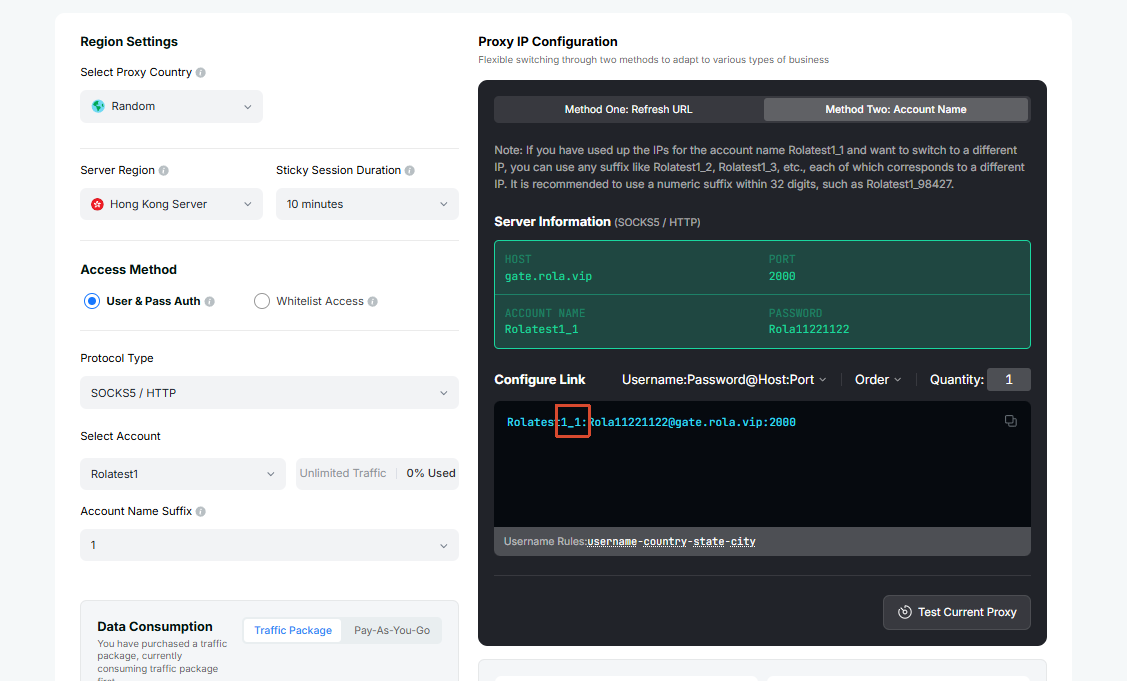
If one workflow needs to keep the same IP during the session time, use the same account name and sessiontime:
test_1-country-us-sessiontime-10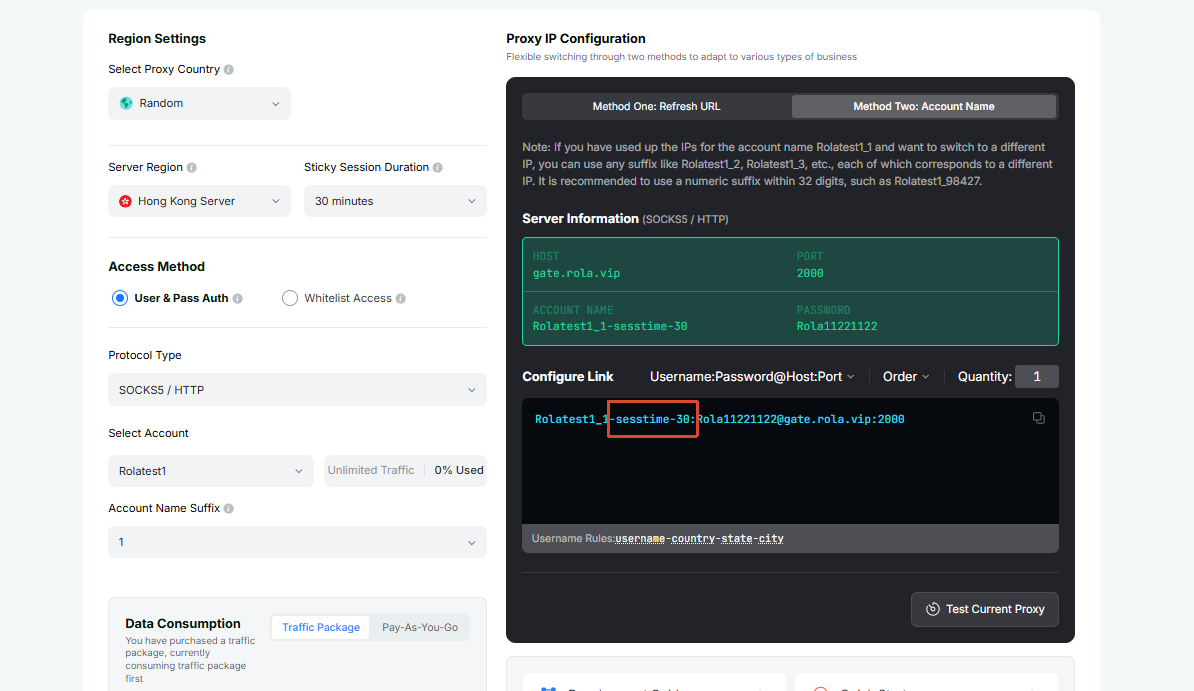
To run multiple independent IPs, use a different sessionid for each task:
test_2-country-us-sessiontime-10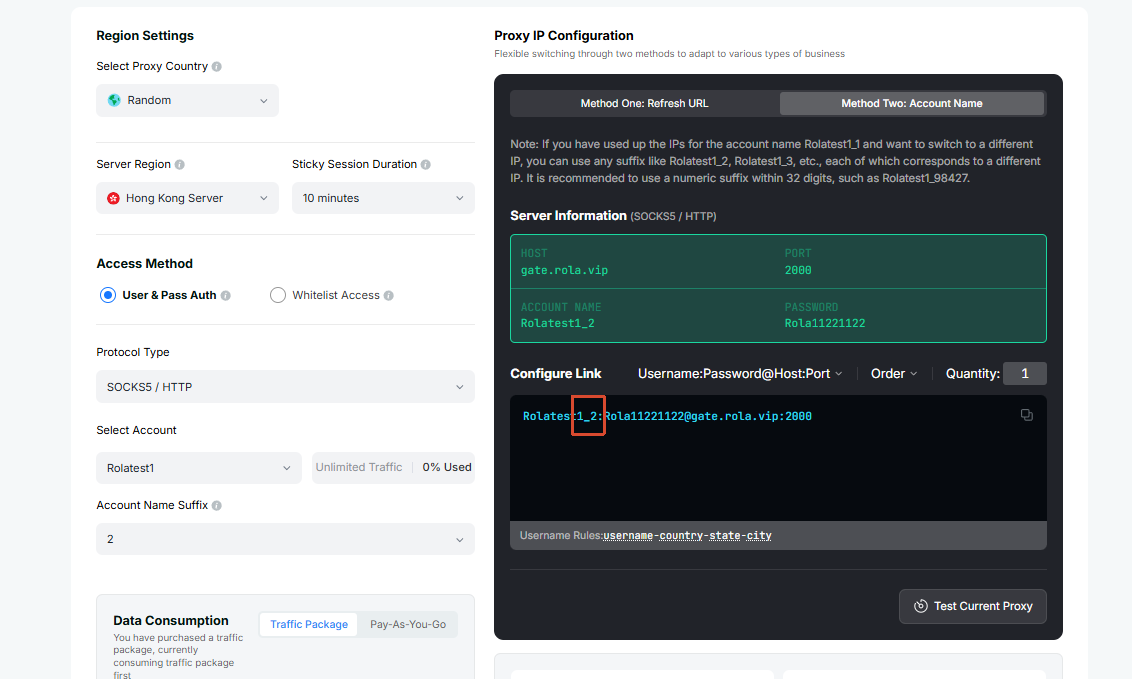
New IP for Every Request
If the task does not need to keep a session and you want every request to use a new IP, append -f-1 to the account parameters:
test-country-us-f-1If you also need to specify a sessionid, you can write:
test_1-country-us-f-1-f-1 gives every request a new IP. It is suitable for scraping, bulk access, availability checks, and other stateless tasks. It is the opposite of fixed-session behavior: for login, registration, checkout, form submission, and other continuous workflows, use a fixed sessionid and sessiontime instead, and avoid using -f-1.
Location Parameters
Rotating Residential, Rotating Datacenter, and Mobile IP all support country for country-level targeting. Only Rotating Residential additionally supports state and city; Rotating Datacenter and Mobile IP can target down to the country only.
For Rotating Residential, location precision goes from broad to narrow:
country -> state -> cityRecommended order:
- Start with
countryand confirm that the proxy connects normally. - If you are using Rotating Residential and the workflow requires more precision, add
state. - Add
cityonly when city-level targeting is necessary on Rotating Residential.
WARNING
state and city apply only to Rotating Residential. Rotating Datacenter and Mobile IP currently support country only.
Session Time
sessiontime sets how long the session should be kept. The unit is minutes, and the supported range is 1-120 minutes.
test_1-country-us-sessiontime-10This means:
- The
sessionidis1; - Use a US exit;
- Keep the session for 10 minutes within the supported 1-120 minute range;
- During the session time,
test_1will try to keep the same IP.
Recommended Configurations
| Network | Scenario | Recommended Username Parameters |
|---|---|---|
| All | Country-level targeting | test-country-us |
| Rotating Residential | State-level targeting | test-country-us-state-ny |
| Rotating Residential | City-level targeting | test-country-us-state-ny-city-newyork |
| All | Login or registration flow | test_1-country-us-sessiontime-10 |
| All | Checkout or form submission | test_1-country-us-sessiontime-15 |
| All | Multiple independent tasks | test_1-country-us-sessiontime-10, test_2-country-us-sessiontime-10 |
| All | New IP for every request | test-country-us-f-1 |
The usernames above are shown for Rotating Residential. For Rotating Datacenter and Mobile IP, swap in the marked account name, e.g.
test_dc-country-us,test_mobile_1-country-us-sessiontime-10.
TIP
If you are unsure, start with country. Use a fixed sessionid and sessiontime when one workflow needs to keep the same IP; use different sessionid values when you need multiple independent exits; append -f-1 when every request should use a new IP.